Best Reseller Apps 2026: 10 Apps Tested on Thrift Finds
By the Numbers
Store ratings checked Sep 27, 2026. How we count
Most “best reseller apps” lists are written by companies that sell one of the apps, and few of them show any testing. So we ran our own. We photographed 29 real items at two thrift stores, ran every photo through five apps, and checked each answer against what those items actually sold for on eBay.
The result that matters most for your money, getting the value right, wasn’t close. Underpriced came within 25% of the real sold price on 9 of 11 items. The next best app managed 6. One app managed 1.
Our picks by job:
- Deciding whether to buy at the tag price: Underpriced. Closest values in our test, and it shows the actual sales behind every number.
- A free name for something: Google Lens. Fast and accurate on names, but it never showed what anything sells for used.
- Piles of books, games and DVDs: Flippr, with barcode scanning and a free start.
- Amazon book scouting: ScoutIQ.
- Posting one item to several marketplaces: Vendoo or List Perfectly.
Looking for where to sell rather than tools to run it? Our nine marketplaces compared for beginners covers eBay, Mercari, Poshmark, Facebook Marketplace and the rest, with each one’s fee and payout rules.
Disclosure: we make Underpriced, one of the apps on this list. We tested five apps on the same photos; the other five weren’t in the test and are described from their official pages. All prices were checked Oct 13, 2026 in the US App Store, Google Play and on each company’s pricing page.
The test in one table
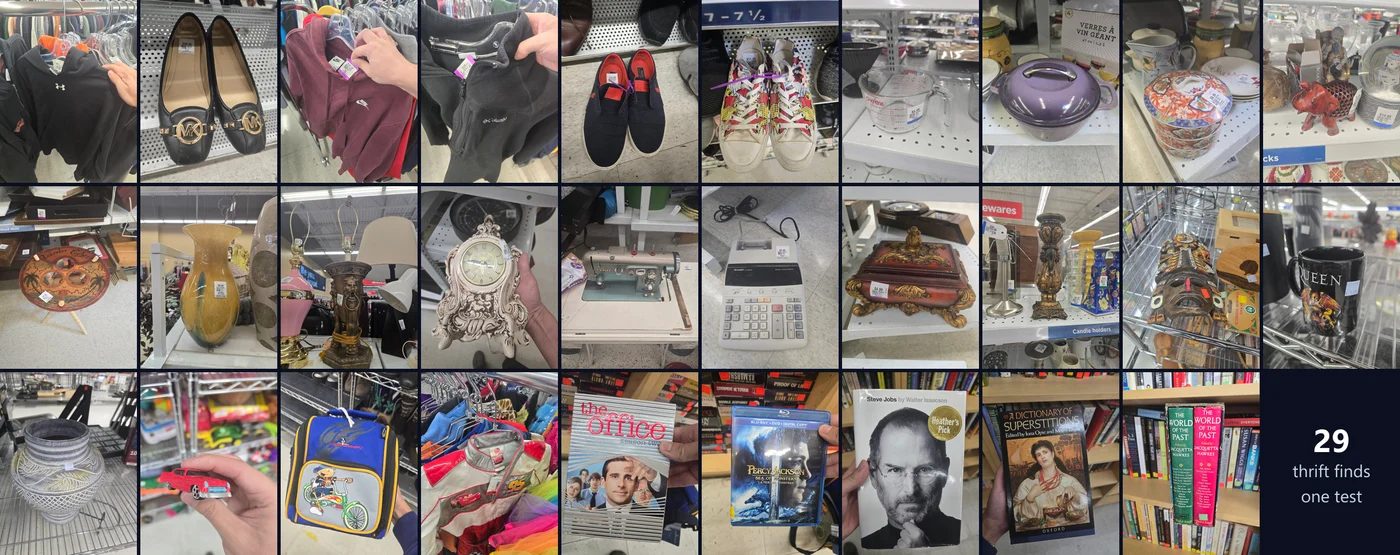
Two things to know first. Of the 29 items, 11 had at least five matching eBay sales in the last 90 days, enough to know the real price, so those 11 are what we score values on. And one item, a die-cast toy car, we couldn’t identify for certain ourselves, so names are scored out of 28.
| App | Value within 25% of the real sold price | Typical miss on value | Named the item exactly | Seconds per item |
|---|---|---|---|---|
| Underpriced | 9 of 11 | 11% | 25 of 28 | 39 |
| Flippr | 6 of 11 | 25% | 22 of 28 | 31 |
| Cluzy | 4 of 11 | 60% | 27 of 28 | 16 |
| ThriftAI | 1 of 11 | 85% | 21 of 28 | 49 |
| Google Lens | doesn’t give a resale value | n/a | 25 of 28 | 9 |
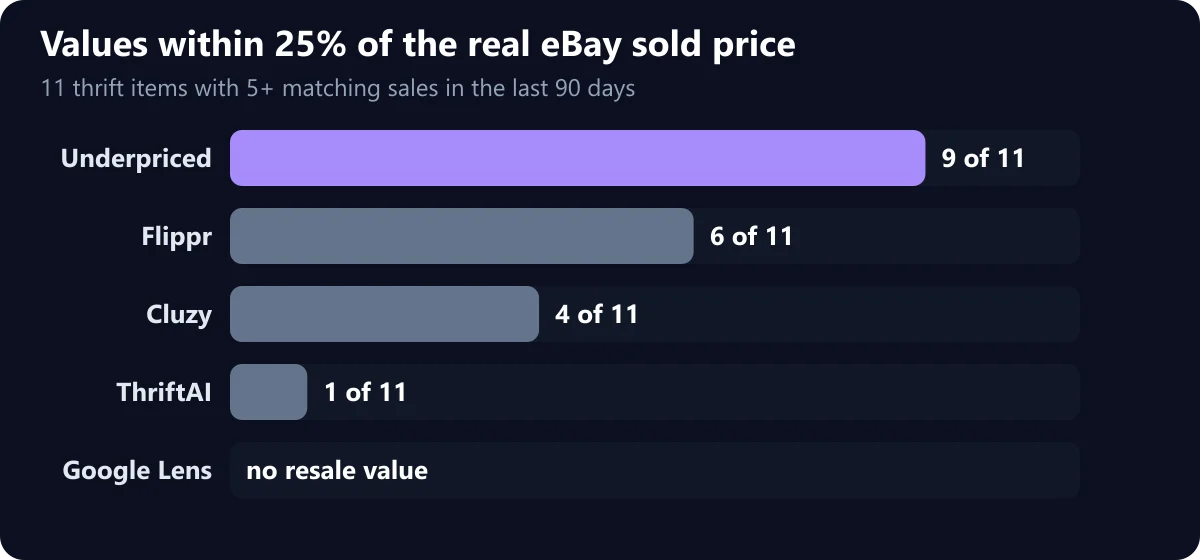
Why we rank on value, not names. Every app named at least 21 of the 28 items exactly. Naming is mostly solved. Where the apps split apart is the price, and the price is what decides whether you make money. An app that names a Nike hoodie perfectly and then says it’s worth $35, when it actually sells for $24, costs you more than one that hesitates on the name.
We also checked the buy-or-skip advice on the four items where the answer was obvious: at least $3 of profit or loss after eBay’s fees. Underpriced got all four right. Flippr got the three it gave advice on right. ThriftAI got two of four.
Five real items and what each app said
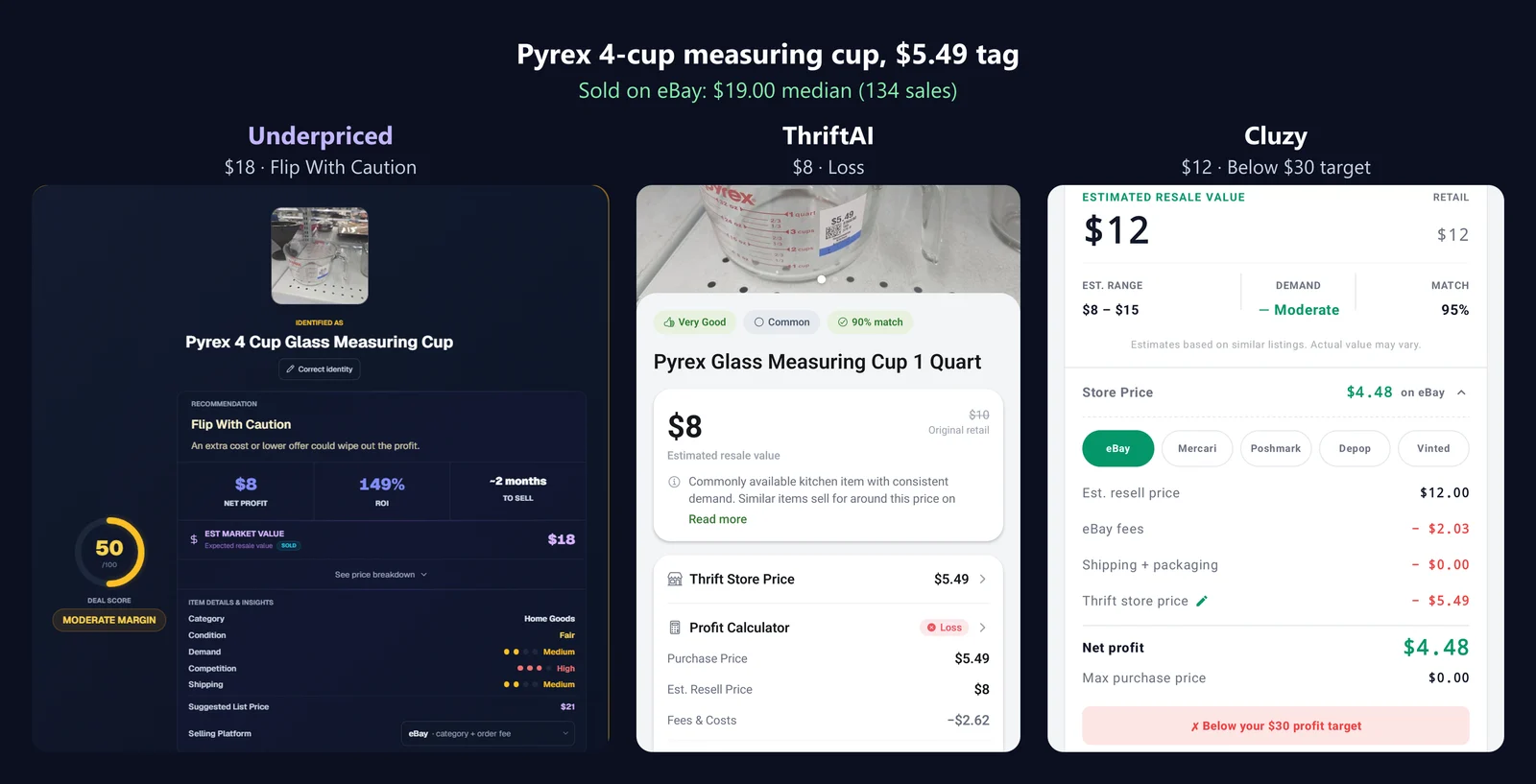
Pyrex 4-cup measuring cup, $5.49 tag
It sells for $19.00 on eBay (median of 134 sales). After eBay’s fee you’d keep about $8.87, so it’s a buy.
| App | Value | Advice |
|---|---|---|
| Underpriced | $18 | Flip With Caution |
| Flippr | $10, a photo estimate until you run its deeper search | none yet |
| Cluzy | $8 to $15 | Below its $30 profit target |
| ThriftAI | $8 | Loss |
| Google Lens | New ones on Amazon, about $22 to $28 | none |
Underpriced was within $1 of the real price and the only app that said to buy it. ThriftAI called it a loss on an item that makes about $9.
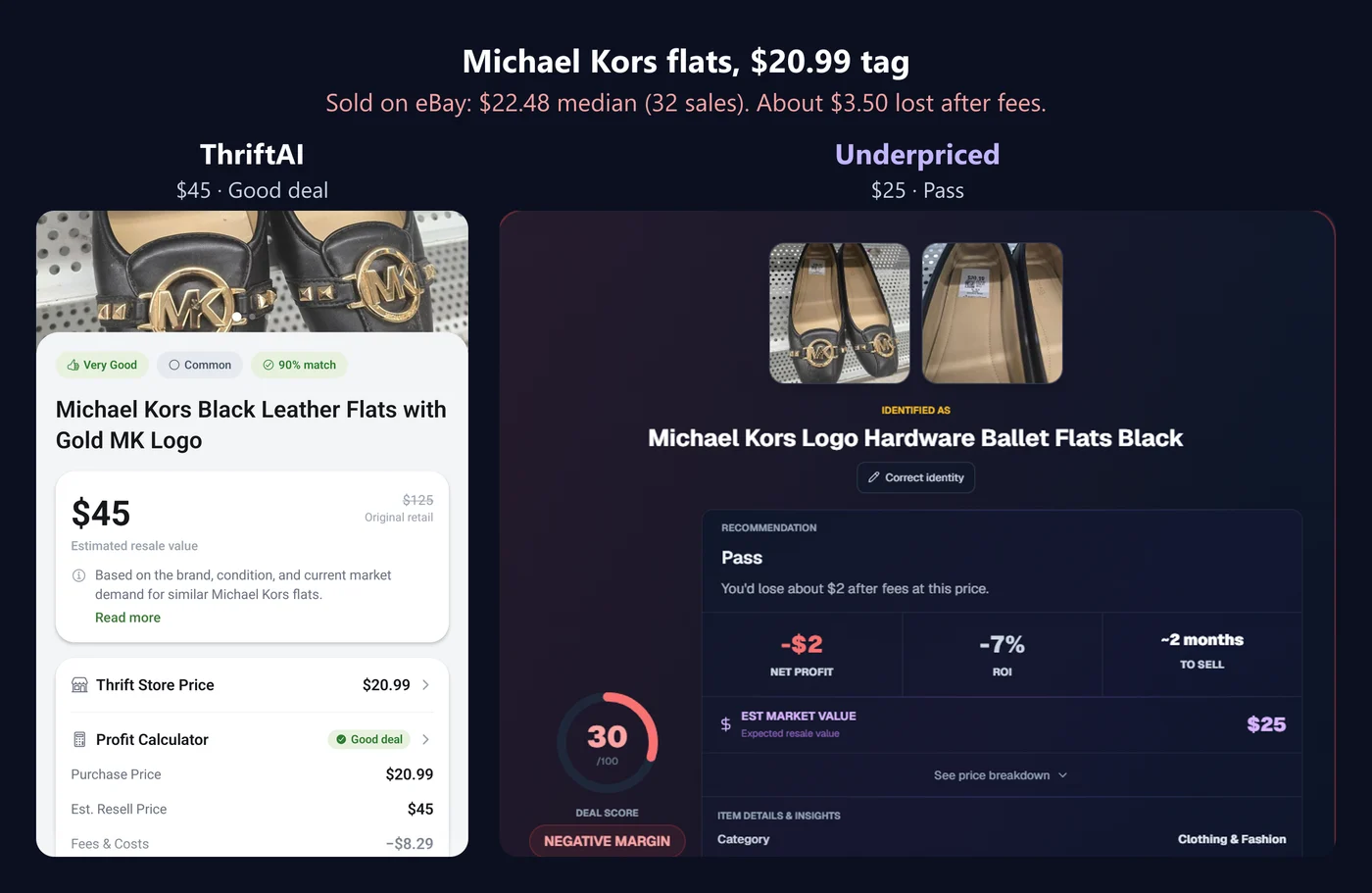
Michael Kors flats, $20.99 tag
They sell for $22.48 (median of 32 sales). After fees you’d lose about $3.50, so it’s a skip.
| App | Value | Advice |
|---|---|---|
| Underpriced | $25 | Pass |
| Flippr | $29.99 | Skip |
| Cluzy | $35 to $55 | Below its $30 profit target |
| ThriftAI | $45 | Good deal |
ThriftAI doubled the value and called a money-loser a good deal.
Nike hoodie, men’s L, $16.49 tag
It sells for $23.88 (median of 17 sales), which leaves about $2.37 after fees: barely worth the effort.
| App | Value |
|---|---|
| Underpriced | $23 |
| Flippr | $17.97 |
| Cluzy | $20 to $35 |
| ThriftAI | $35 |
Underpriced was within $1. ThriftAI was $11 high.
Sharp EL-2192RII printing calculator, $9.99 tag
It sells for $16.98 (median of 10 sales).
| App | Value |
|---|---|
| Flippr | $16.99 |
| Cluzy | $15 to $35 |
| ThriftAI | $20 |
| Underpriced | $13 |
| Google Lens | Shop listings from about $77 to $137 |
Flippr nailed this one and we were $4 low. Lens’s shop listings ran four to eight times the real sold price, which is exactly the trap of pricing from Google.
Steve Jobs by Walter Isaacson, hardcover, $3.99 tag
It sells for $5.00 (median of 15 sales). Not worth buying to resell at this tag.
| App | Value |
|---|---|
| Flippr | $5.04 |
| Underpriced | $6 |
| Cluzy | $5 to $12 |
| ThriftAI | $10 |
Flippr was closest. ThriftAI doubled the value again.
Price comparison: what each app costs
| App | Free way to start | Paid price (US) | Scans on the paid plan |
|---|---|---|---|
| Underpriced | 5 analyses, no card, nothing to cancel | Reseller $9.99/month (first month $4.99), Pro $14.99, Ultra $24.99; 20% off yearly | 75, 200 or 500 a month |
| Google Lens | Free | Free | Unlimited |
| Flippr | Free start | $25/month or $95/year on its site; the App Store lists $24.99/month | Up to 3,000 a month |
| Cluzy | Free download, then a trial | $6.99/week, $49.99/year ($34.99 discounted) or $99.99 lifetime; MultiScan $9.99 extra | Not stated |
| ThriftAI | 3-day trial, required before the first scan | $9.99/month or $19.99 to $49.99/year; Multi Mode $4.99 and Sell Through Rate $19.99 to $39.99 extra | Not stated |
| ChatGPT | Free plan with upload limits | Paid plans raise the limits | Varies |
| eBay app | Free | Free (selling fees separate) | Unlimited |
| ScoutIQ | 14-day trial | Live Only $14/month, Live + Database $44/month; less billed yearly | Unlimited live lookups |
| Vendoo | 14-day trial | Starter $14.99, Growth $29.99, Pro $59.99 a month | Unlimited items |
| List Perfectly | No free tier listed | Simple $29, Business $49, Pro $69, Pro Plus from $99 a month | Unlimited cross-listing; AI listings and scans capped |
Is the cheapest app the best deal? On a yearly plan, Underpriced Reseller and Flippr both come to about $95 a year, Cluzy $35 to $50, and ThriftAI $20 to $50. The cheaper apps are cheaper. But in our test they were also the furthest off on value, and one wrong value can cost more than the difference: ThriftAI’s “Good deal” on the Michael Kors flats would have lost about $3.50. A couple of those a month and the cheap plan isn’t cheap anymore.
Features compared
| Underpriced | Flippr | Cluzy | ThriftAI | Google Lens | |
|---|---|---|---|---|---|
| Price based on used sold listings | Yes: eBay, Poshmark and Mercari | Yes: eBay | An estimate; sell-through rate on paid plans | An estimate, with sold and active listings below | No: new and asking prices only |
| Shows each matching sale | Yes, with sale date, shipping and buyer total | Yes | Not found in our test | Yes, but loosely matched | No |
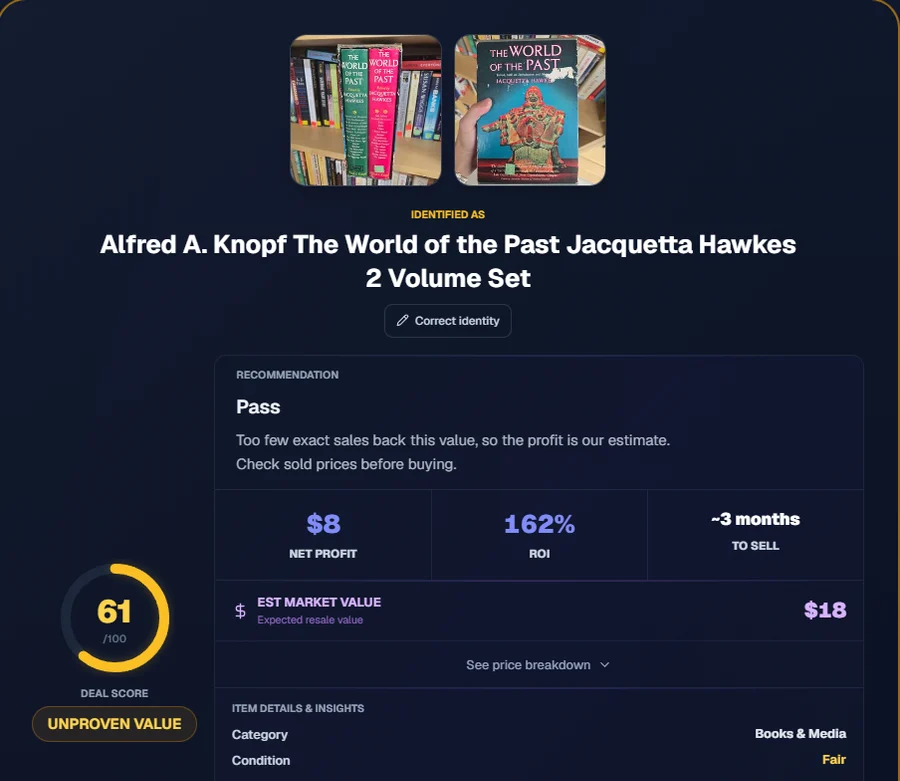
| Says when there isn’t enough data | Yes (“Unproven Value”) | Labels photo-only estimates | Not found | Not found | n/a |
| Profit at your tag price | Yes, with eBay’s fee on shipping and tax | Yes | Yes, plus a max purchase price | Yes | No |
| Buy or skip advice | Flip It, Flip With Caution or Pass | Flippr score: Good flip or Skip | Against a $30 profit target | Good deal or Loss | No |
| You choose who pays shipping | Yes | Not found | Not found | Not found | No |
| Several items at once | 3 at once on Reseller, 5 on Pro, 7 on Ultra | Many items in one photo | MultiScan (paid add-on) | Multi Mode (paid add-on) | No |
| Barcode scanning | Yes | Yes | Not found | Not found | Yes |
| Listing help | Suggested price and drafts for several marketplaces | Auto list | One-tap eBay listing | List on eBay | No |
| Tracking | Flip tracker for bought, listed and sold | Stats and CSV export | Saved finds | History and favorites | No |
| Where it runs | iPhone, Android, web, Chrome and Firefox extensions | iPhone, Android | iPhone, Android | iPhone, Android | Google app, Chrome |
“Not found” means we didn’t see it in the app during the test or on its store listing. It doesn’t mean the app can’t do it.
The 10 apps
1. Underpriced
Best for: deciding whether to buy at the tag price, then listing and tracking the flip. Tested.
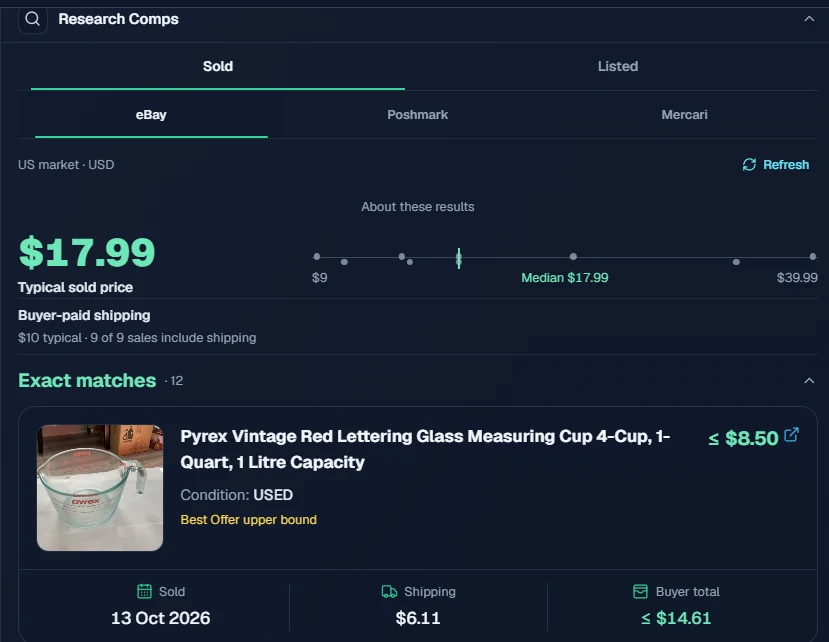
Snap the item and enter the tag price. Underpriced names it, finds matching sold listings, and tells you what you’d keep after the marketplace fee and shipping, with a clear Flip It, Flip With Caution or Pass.
- Price: 5 free analyses, no card. Reseller $9.99 a month for 75 analyses (first month $4.99); Pro $14.99 for 200; Ultra $24.99 for 500.
- What sets it apart:
- It shows its work. Every matching sale is listed with its photo, price, sale date, shipping and buyer total, linked so you can check it. Sales where a best offer was accepted are flagged, because eBay shows the asking price on those, not what the buyer paid.
- Sold prices from eBay, Poshmark and Mercari, plus current listings to see what’s sitting.
- Fees the way the marketplace charges them. You pick the marketplace and who pays shipping. On eBay it charges the fee on shipping and sales tax too, which most profit math forgets.
- It admits when it doesn’t know. With too few matching sales, the result says “Unproven Value” instead of handing you a confident guess.
- The rest of the flip: Batch Mode for several items at once, a suggested list price, listing drafts for several marketplaces, a flip tracker, and authenticity and negotiation tools, on iPhone, Android, the web and Chrome and Firefox extensions.
- Watch out: at about 39 seconds an item it’s slower than Lens, and it read a small KitchenAid mark on a Dutch oven as Le Creuset.
2. Google Lens
Best for: a free, fast name. Tested.
- Price: free, in the Google app and Chrome.
- Strengths: about 9 seconds per item and 25 of 28 names exact. Very good on anything with a model number, barcode or ISBN.
- Watch out: no used resale value. Every price it showed was a new retail price, an ad or a single asking price. Use it for the name, then check sold prices. More in Google Lens vs a resale scanner.
3. Flippr
Best for: books, DVDs, games and shelf or pile scans. Tested (Android 3.6.7, free start).
- Price: free start; $25 a month or $95 a year for up to 3,000 scans a month.
- Strengths: second on value overall, closest of all on the calculator and the Steve Jobs book, barcode scanning and CSV export.
- Watch out: on decor and unbranded items it often gave a generic name (“wall mask brown”, “wine caddy”) and a photo-only estimate unless you run its deeper search.
4. Cluzy
Best for: naming general thrift finds and listing to eBay. Tested (Android 1.0.8, on its free trial).
- Price: $6.99 a week, $49.99 a year ($34.99 discounted) or $99.99 lifetime on the US App Store; MultiScan is $9.99 extra.
- Strengths: the most exact names in the test, 27 of 28, in about 16 seconds.
- Watch out: values were within 25% on only 4 of 11 items, and its advice compares every item against a default $30 profit target, so almost every thrift find shows as “below target”. Sell-through rate and multi-scan are behind the paywall.
5. ThriftAI: Profit Identifier
Best for: a quick scan with profit math, if you’ll double-check the value. Tested (1.0.84, on its 3-day trial).
- Price: 3-day trial, then $9.99 a month or $19.99 to $49.99 a year, plus add-ons. The paywall shows on the first scan.
- Strengths: decent names (21 of 28), a clear Good deal or Loss line, community finds and an AI chat.
- Watch out: values ran high on 10 of the 11 items we could check, which led to a “Good deal” on flats that lose money and a “Loss” on a measuring cup that makes about $9. Full review: Thrift AI review.
6. ChatGPT
Best for: questions about an item: what it is, how to tell versions apart, what to check. Not in our test.
- Price: a free plan with upload limits; paid plans raise them.
- How to use it well: ask specific questions (“how do I tell a 1970s Pyrex from a reissue?”) rather than “what’s this worth?”, and check any price it gives against sold listings.
- Watch out: it isn’t built for sourcing. You still check sold listings and do the fee math yourself, and photo limits on the free plan make it slow in a store.
7. eBay app and Product Research
Best for: sold research by hand, and selling. Not in our test.
- Price: free. Product Research is in Seller Hub; selling fees are separate.
- Strengths: it’s the source most resale apps lean on.
- Watch out: it’s manual. You match the item, filter the results and do the fee math. Our free eBay sold listings search and flip profit calculator speed that up.
8. ScoutIQ
Best for: scouting books for Amazon. Not in our test.
- Price: 14-day free trial, then Live Only $14 a month or Live + Database $44 a month (less billed yearly). Live lookups need a professional Amazon seller account; the database alone doesn’t.
- Strengths: fast barcode scans with Amazon economics, and a downloadable database for stores with no signal.
- Watch out: it’s built for Amazon books, not general thrift finds.
9. Vendoo
Best for: posting the same item to several marketplaces. Not in our test.
- Price: 14-day free trial, then Starter $14.99 a month, Growth $29.99 or Pro $59.99.
- Strengths: a cheap way into cross-listing.
- Watch out: check that it supports your marketplaces, and how delisting works after a sale, before you commit.
10. List Perfectly
Best for: cross-listing at volume. Not in our test.
- Price: Simple $29 a month, Business $49, Pro $69, Pro Plus from $99.
- Strengths: unlimited cross-listing on every plan; higher plans add bulk import, auto delist and Shopify.
- Watch out: Simple leaves out bulk import and auto delist, and AI listings and barcode scans are capped each month.
What to look for in a reseller app
Running 29 items through these apps side by side made it clear what separates a useful app from a confident guess. Before you pay for any of them, check:
- Sold prices, not asking prices. Lens showed the calculator at $77 to $137. It sells for $17. An app that leans on shopping results or current listings makes everything look valuable.
- Can you see the sales? A single number is a guess until you can see what it’s built from. With the sales in front of you, a bad match takes seconds to spot.
- Does it admit when it doesn’t know? Unbranded decor often has no good sales to go on. An app that says so saves you from confident wrong numbers.
- The fee math on cheap items. eBay charges its fee on shipping and sales tax, not just the price. On a $19 item that’s about a quarter of the sale. If an app’s profit on cheap items looks too good, check how it handles fees.
- Speed against accuracy. Lens answers in 9 seconds and Cluzy in 16; Underpriced takes about 39. Half a minute per item is worth it if it stops one bad buy per trip.
- How you start. Some apps put the very first scan behind a trial that renews. Others let you try a few items free with no card. Try before you commit.
Which app for which job
| If your problem is… | Start with | Why |
|---|---|---|
| “I don’t know if it’s worth buying at this tag.” | Underpriced | Closest values in our test, with the sales and the fee math shown |
| “I don’t know what this is.” | Google Lens | Free and fast for a name; check the sold price separately |
| “I scan piles of books and DVDs.” | Flippr, or ScoutIQ for Amazon books | Barcode and bulk media scanning |
| “I copy the same listing to four sites.” | Vendoo or List Perfectly | Cross-listing and delisting |
| “I’m just starting.” | Underpriced’s 5 free analyses, Lens and the eBay app | See what a real sold-price check looks like before you pay for anything |
How we tested
We photographed 29 items at Value Village and the Salvation Army between Sep 20 and Oct 8, 2026: clothes, shoes, kitchenware, decor, a calculator, toys, DVDs and books. Each item got one to three photos (the whole item, plus the tag, label or marks where there were any), and every scanner app got the same photos and the same tag price. Google Lens got the main photo of each item, the way most people use it.
For the real price we searched eBay sold listings by hand for each item: sold in the last 90 days, pre-owned, exact matches only. We left out sales where a best offer was accepted, because eBay shows the asking price on those rather than what the buyer paid. Eleven items had five or more matching sales; those are the ones we score values on. A value counts as close when it’s within 25% of the median sold price, or when the median falls inside the app’s range. A name counts as exact when the brand or maker and the type of item are right and nothing in the photos says otherwise.
For buy-or-skip advice we only scored items where the answer was obvious: at least $3 of profit or loss at the tag price after eBay’s fee, which eBay charges on the item price, the shipping and the sales tax (we used a 7.5% tax rate and the buyer paying shipping). Four items qualified.
Google Lens, ThriftAI, Cluzy and Flippr were tested Oct 10-11, 2026 on Android. Underpriced was tested on the web app on Oct 13, 2026, on a paid plan with shipping set to Buyer pays.
Frequently Asked Questions
What is the best app for resellers?
It depends on the job. For deciding whether to buy, Underpriced had the closest values in our test and got every obvious buy-or-skip call right. For a free name, Google Lens. For books and media, Flippr. For cross-listing, Vendoo or List Perfectly.
Which reseller app is the most accurate?
On value, Underpriced: within 25% of the real eBay sold price on 9 of 11 items, with a typical miss of 11%. Flippr was next at 6 of 11. On names alone, Cluzy got the most exactly right (27 of 28), with Underpriced and Google Lens at 25.
Which reseller app is cheapest?
Google Lens and the eBay app are free but leave the sold-price research and fee math to you. Among scanner apps, ThriftAI and Cluzy have the lowest yearly prices, but in our test their values were the furthest off. Underpriced and Flippr both come to about $95 a year, and Underpriced lets you try 5 items free with no card.
Is there a free app that shows sold prices?
The eBay app does, if you filter to sold listings and match the item yourself. Google Lens is free but shows new and asking prices, not sold prices. Underpriced gives you 5 free analyses with no card, and Flippr has a free start.
Related guides
Related articles
Google Lens vs a resale scanner, tested
We ran 29 thrift store items through Google Lens and Underpriced. Lens named 25 exactly but never showed a used sold price. Here is when Lens is enough and when a resale scanner pays off.
Thrift AI review with test results
ThriftAI: Profit Identifier costs $9.99 a month after a 3-day trial. We tested it on 29 thrift store items against eBay sold prices and our own app. Its names were good; its values ran high.
best crosslisting software comparison
Detailed crosslisting tool comparison with pricing breakdowns, platform compatibility charts, bulk listing capabilities, template systems, and calculated ROI for List Perfectly Pro, Vendoo, Crosslist, OneShop, and Flyp.
best apps to resell on: 9 marketplaces compared
Nine apps to resell on, compared for beginners: fees on a $50 sale, what sells there, how shipping works and when you get paid.
how to start reselling
Start with items you own, choose one sourcing lane, list your first products, and avoid beginner mistakes before scaling.
Tools that help with this topic
instant eBay sold comp lookup
Build source-backed sold-comp research links for eBay Advanced Search, eBay Product Research, Mercari, and Poshmark, plus a 7-comp pricing worksheet.
flip profit calculator
Calculate net profit, ROI, margin, break-even price, and target sale price after marketplace fees, shipping, reserves, and labor. Free calculator included.
reselling app fee calculator
Calculate Poshmark fees around the $15 threshold, compare eBay managed-payment profit with PayPal, and audit Mercari and marketplace payouts.
listing title optimizer
Build factual marketplace titles with source-checked limits, emoji cleanup, missing-field warnings, and crosslisting variants across six platforms.